Well, this is an interesting one.
If you manage Ribbon SBCs, you may have seen recent discussion around PHP2Shell and wondered whether it actually applies to the Ribbon SBC Edge platform.
Unfortunately, the answer is yes. But maybe it’s not as scary as you think

The lack of a response here suggests the module isn’t loaded.
Anyway, back to the PHP2Shell article.

Ribbon has acknowledged that the SBC 1000/2000 and SBC SWe Edge platforms are affected, and remediation firmware is currently being prepared.
The slightly more interesting question for me was:
Wait… Ribbon SBCs run PHP?
Turns out, yes! Let’s have a look.
Is the Ribbon SBC Web UI actually running PHP?
While the SBC Edge is presented and managed as an appliance, there is of course an operating system and web application underneath of the Sonus/Ribbon Web UI.
On an SBC where shell access is available, we can see that PHP is present and running.
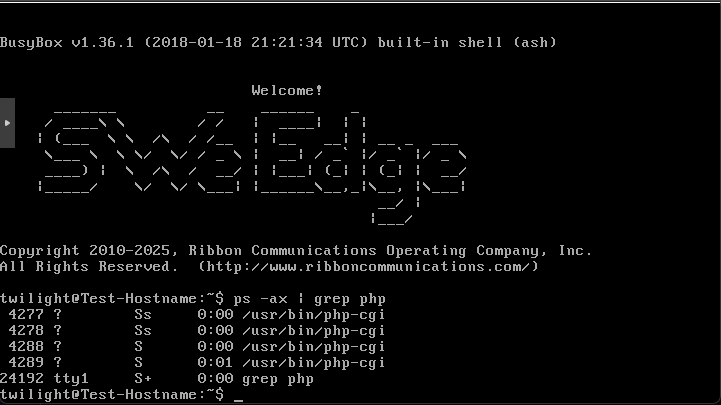
Figure 1: PHP running on an SBC SWe Edge appliance.
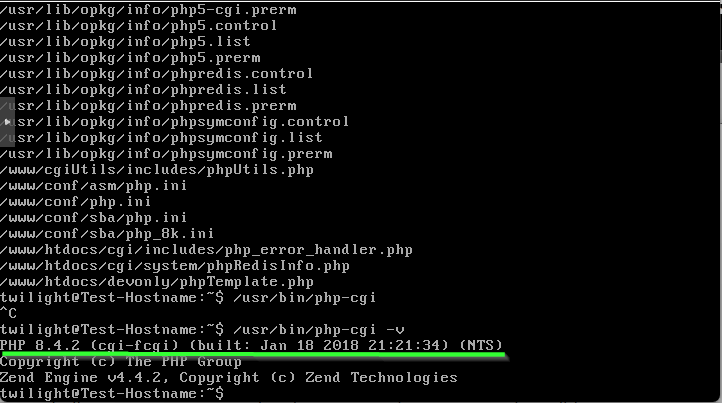
Figure 2: PHP version 8.4.2 installed on my SBC SWe Edge running 13.1.
So why not just update PHP?
This is where SBC appliances differ from your average Linux web server.
You should not simply SSH into the SBC and start replacing PHP packages.
The SBC 1000/2000 does not expose the underlying Linux shell to administrators. SWe Edge provides greater access to the underlying system, but it remains a managed appliance rather than a general-purpose Linux server.
Making unsupported changes to the underlying software risks leaving the SBC in an unsupported state.
In other words, although PHP is the affected component, the appropriate remediation needs to come from Ribbon as an SBC software release.
That means we’re waiting for firmware.
What is Ribbon doing about it?
Ribbon has acknowledged the issue and is testing updated firmware.
At the time of writing, Ribbon is targeting 30 November for General Availability of the remediation, with the following planned GA releases:
- SBC 1000/2000: 12.4.2
- SBC SWe Edge: 13.1.1
Ribbon has also provided pre-release builds for customers who need the remediation before the GA releases become available.
(You should only install these if you cannot lock down the SBC web interface, these have not been through full validation testing)
SBC 1000/2000
Pre-release builds:
- 12.2.1B781
- 12.3.1B813
- 12.4.2B18
SBC SWe Edge
Pre-release builds:
- 12.2.1B82
- 12.3.1B102
- 13.0.1B84
- 13.1.1B97
Note: The release numbers and 30 November target above are based on Ribbon’s current guidance available to me at the time of writing. If you have access to the Ribbon Support portal, you can check their most recent guidance here.
Okay, should I panic?
Probably not. But you should check your firewall. NOW
For the overwhelming majority of Ribbon SBC deployments I’ve worked with, there is absolutely no reason for the SBC management interface on TCP 80/443 to be exposed directly to the public Internet.
The SBC obviously needs to communicate with Internet-based SIP and media services in many deployments, particularly when being used for Microsoft Teams Direct Routing, but that does not mean its web/management interface needs to be publicly accessible.
What should I do now?

My recommendation is fairly straightforward.
1. Check whether your Web UI is Internet-accessible
Check the firewall/NAT policy in front of your SBC and determine who can reach TCP 80/443 on its management interface.
If those ports can be reached by arbitrary Internet hosts, restrict them immediately.
Ideally, management access should only be available from known administrative networks, VPN infrastructure, bastion hosts or other specifically trusted management addresses.
2. If you can’t use a Firewall, use the SBC’s own access controls
If you can’t lock down the SBC’s web interface using a firewall, you can also use the built in ACL’s
Login to your SBC and back it up in case you lock yourself out.
Navigate to Tasks > Backup/Restore Config > Enter a password and click OK
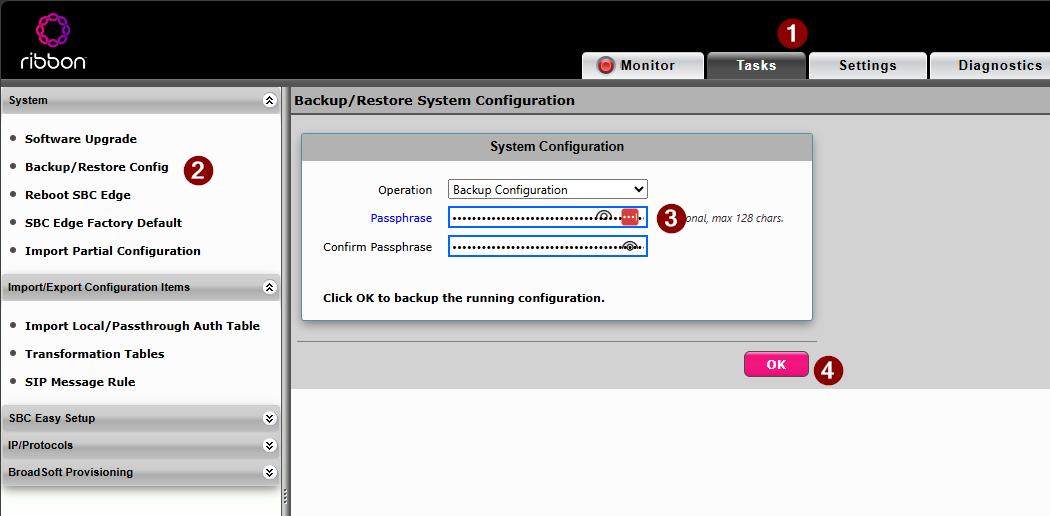
Next, navigate to Settings > Protocols > IP > Access Control Lists
Create a new Access Control List by clicking the Green Plus icon (3) and name it something descriptive, like “Allow WebUI from Trusted Hosts”
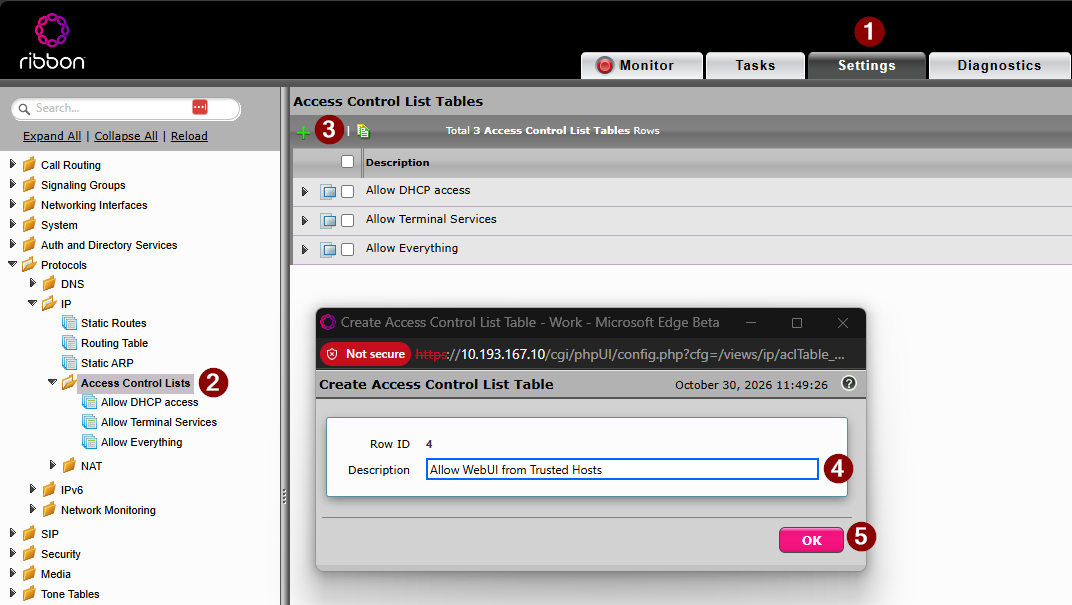
Click on the new ACL and add a new rule with a descriptive name, such as “UC Jump Box” or “Management host”
Set the Service to HTTPS with the Source Address of your management host/network and the destination of the SBC.
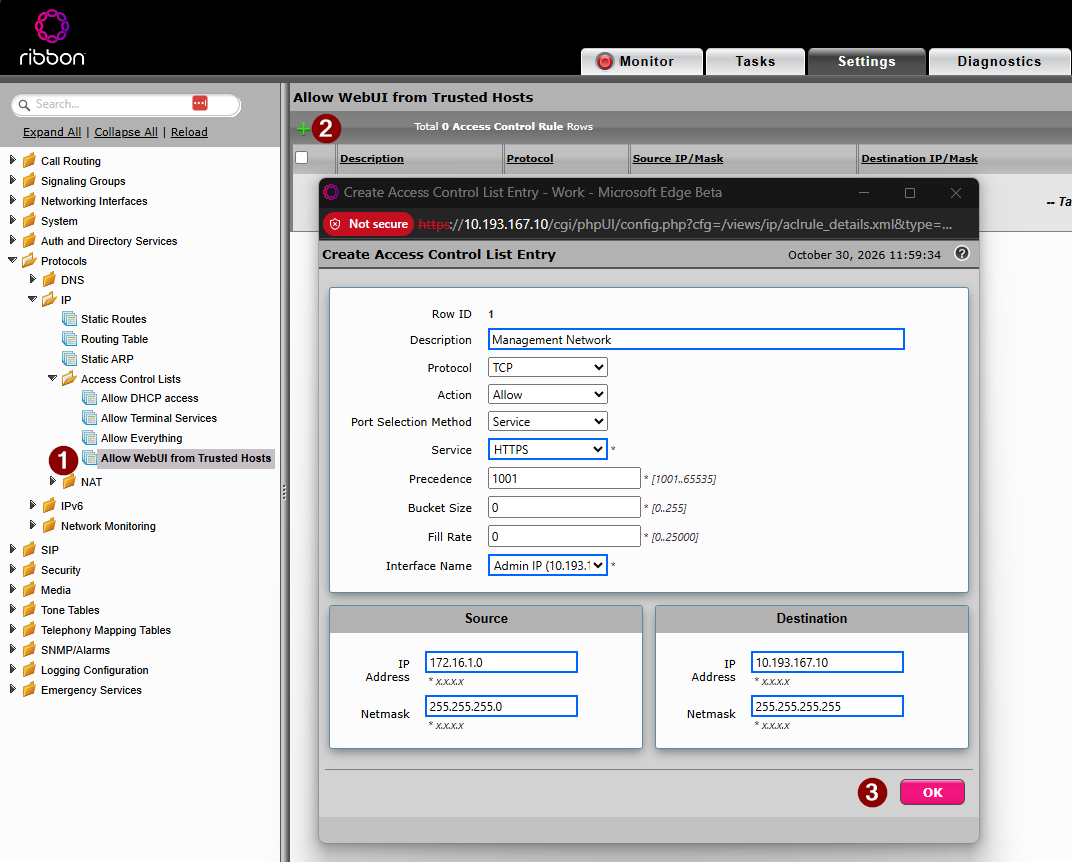
Repeat for HTTP and any other management hosts you have (note you will need to increase the precedence number each time)
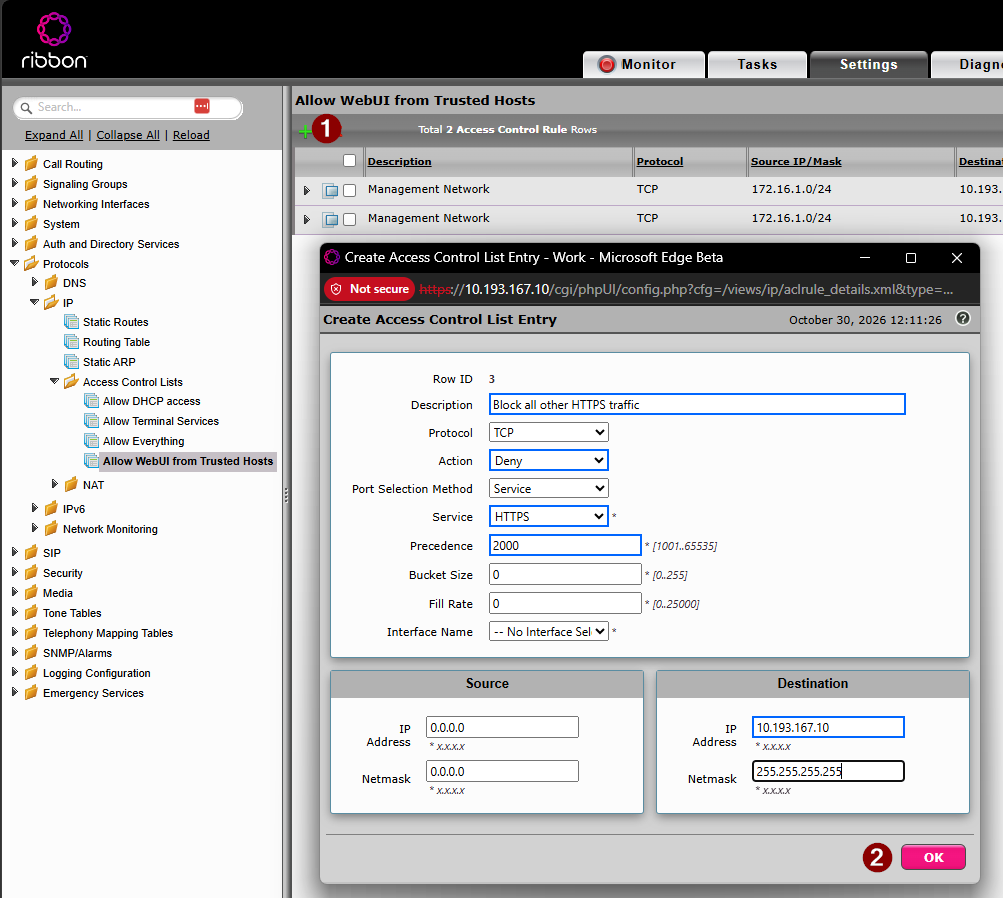
Add the specific blocking rules for HTTP/S, set the action to DENY and the source to 0.0.0.0/0.0.0.0
(Note, I increase the precedence number to 2xxx here, allowing room for more allow rules later)
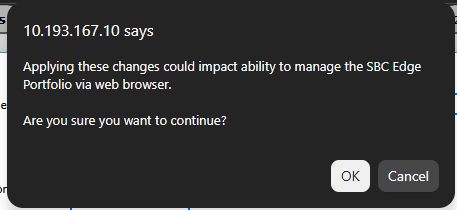
The SBC will warn you this might break things!
Double check your existing rules are okay before pressing OK.
- Check the allow rules include the host you are using and for any typo’s
- Check the new Deny rule has a larger precedence number than the existing allow rules
(Smaller numbers are evaluated first) - Ensure the subnet masks are correct
(Subnet Mask format, not Cisco wildcard mask format!) - Failure to do so will lock yourself out of the SBC.
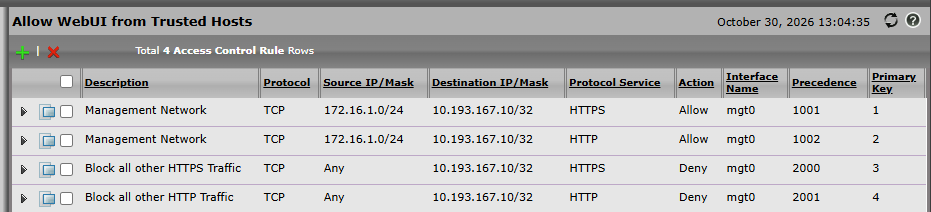
You should end up with a list like this
3. Don’t modify PHP yourself
Even if you have sufficient shell access on SWe Edge to discover PHP and its associated components, don’t treat the SBC like a normal Linux server and start modifying them.
Wait for a supported Ribbon software release.
Telephony infrastructure is perhaps not the ideal place to discover what exciting side effects an unsupported package upgrade might introduce.
4. Consider the pre-release firmware only where necessary
Ribbon has made pre-release firmware available, but I wouldn’t deploy pre-release SBC software simply because it’s newer.
If the Web UI can be restricted to trusted management networks, my preference would be to apply that mitigation and remain on the currently supported firmware until the GA remediation becomes available.
If you have a legitimate requirement for the management interface to remain exposed to untrusted networks and cannot mitigate the exposure through firewalling or access controls, then the balance changes and the pre-release build may warrant consideration.
That should be a risk-based decision, not an automatic upgrade.
Don’t confuse the management plane with the SBC itself
This is probably the most important takeaway.
An SBC is, by definition a SIP Firewall, and frequently sits at a network boundary communicating with external services. It is a security appliance by design and shouldn’t have its Web UI public.
If you’re running Microsoft Teams Direct Routing, Zoom, Genesys PureCloud etc. Your SBCs need Internet connectivity for the services involved in performing its actual job.
That doesn’t mean every service running on the box needs be exposed to the Internet.
Keep your SIP and media requirements separate from your management plane.
If you’ve accidentally got the management interface exposed broadly because “it’s an Internet-facing SBC”, now would be an excellent time to fix that. I’d also recommend reflashing the firmware just in case it has been compromised.
The takeaway
Yes, Ribbon SBC 1000/2000 and SWe Edge are affected by PHP2Shell, and yes, PHP really is running under the hood.
But this isn’t a situation where administrators should go hacking PHP out of the underlying appliance themselves.
My approach would be:
- Check whether TCP 80/443 management access is exposed to untrusted networks.
- Restrict it using perimeter firewalling and SBC access controls where appropriate.
- Stay on supported GA firmware where that mitigation adequately addresses your exposure.
- Consider Ribbon’s pre-release remediation only where the management interface cannot otherwise be protected.
- Move to Ribbon’s remediated GA release once available and appropriate for your environment.
- If your web interface was public, fix that first, then reflash the SBC to remove any potential nasties.
And perhaps add one more item to the eternal security checklist:
Internet-facing SBC ≠ Internet-facing admin interface.
Those are two very different things.
Now excuse me whilst I look away from this cool explosion.