


I’ve spent a fair amount of time over the years helping people read SIP traces and I still despise reading them.

Recently, I’d been helping some of our internal teams understand SIP SDPs in particular. Things like what the m=, c= and o= lines actually mean, where the media is going, which codecs have been offered, and whether what we’re seeing actually makes sense for a Microsoft Teams Direct Routing call.
While doing this, I had a thought:
Surely someone has made the SIP equivalent of Regex101?
As it turns out, a few people have.
I found some good online SIP decoders, and while looking through them I had another thought. Some of these look suspiciously like they have been vibe coded.
And if they can do it…
I can make one of these?
I mean, how hard can it be? I’ve learned a lot about using AI agents to help with my code in other areas. I already had various PowerShell scripts I’d written over the years for working with Ribbon SBC logs and call traces. I knew how Ribbon represents SIP messages in its logs, and more importantly I knew how I interpreted those messages when troubleshooting a Teams Direct Routing call.
So, I figured I should see what would happen if I fed some of that existing work into GitHub Copilot CLI, explained what the scripts were doing and gave it some real-world examples.
Mix that with some Teams Direct Routing best practices and…Tada!
Teams Direct Routing SIP Decoder (GitHub Repo)
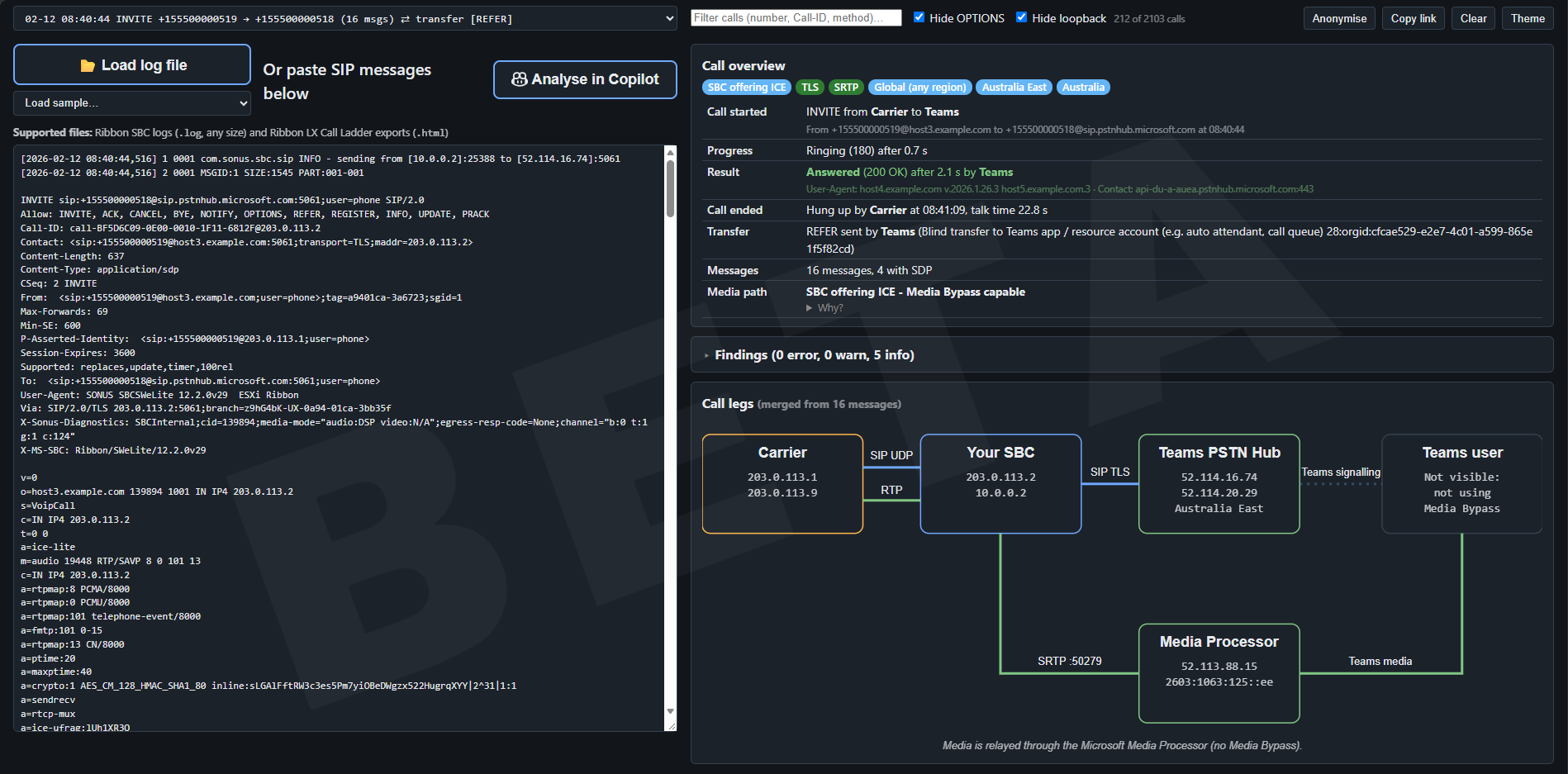
The basic idea is pretty simple: Give it a SIP message and it will try to explain what you’re looking at.
But, after the initial POC, the MadScientist part of me kicked in, and so did the scope creep.
The tool can now take an individual SIP message, multiple messages, an entire Ribbon SBC log or a Ribbon LX Call Ladder export. It groups messages into calls, attempts to correlate the carrier and Teams call legs, decodes the SDP, shows the signalling and media paths, looks at things like Media Bypass and ICE, understands transfers and refer (I got so sick of trying to piece together REFER calls on older SBCs), and checks the call for a bunch of Teams-specific gotchas.
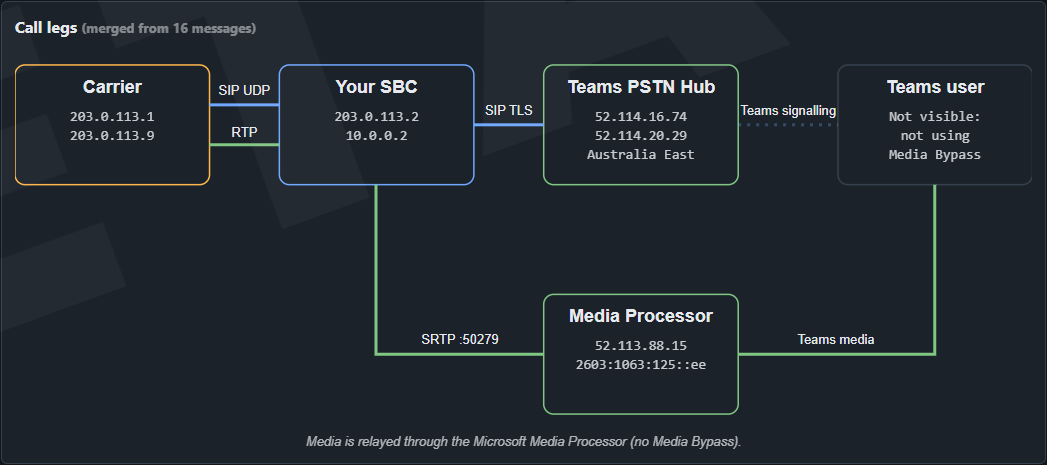
There’s even a call-leg diagram because, at some point, apparently simply decoding SIP wasn’t enough anymore and I wanted to see a cool diagram. (We all like das blinken lights okay!)
Who is this actually for?
I wanted the tool to be useful to two groups of people.
The first is someone who understands the basics of SIP. They know what an INVITE is, they can follow a call ladder, but throw a full SDP at them and perhaps things start getting a little murkier, or heck maybe, just want a fast way to look at a call log instead of waiting for LX to give you the same info.
The second is the traditional IT Pro.
Someone who understands networking, IP addresses and ports, but doesn’t necessarily spend their life staring at SIP messages. They don’t necessarily need to become a voice engineer. They just want to be able to look at a call and spot when something is horrifically wrong.
It’s also one of the reasons I added the Analyse in Copilot feature.
The decoder can do the mechanical work of turning a trace into something more understandable, but sometimes you want to ask questions about what you’re seeing. The tool can prepare the current call and an analysis prompt, ready to paste into Copilot for further investigation.
So how did I build it?
This wasn’t my first substantial experiment with GitHub Copilot CLI, I presently manage my homelab with it, but I’m certainly not going to pretend I’ve mastered agentic development overnight.
I didn’t build an elaborate collection of subagents. I didn’t create some giant autonomous software-development factory and tell it to come back when it was finished.
Initially, a lot of my prompting was actually about planning rather than coding.
I’d use the better models like Opus while working through what I wanted to build and how a feature should behave, then let Copilot’s model routing take over when it came time to actually implement it.
I fed it some of my existing work for decoding Ribbon logs and explained what that code was doing. Then I gave it examples and compared its interpretation of a call with my interpretation of the same call.
Once we had a proof of concept working, things quickly became iterative where I was giving feedback to the agent, about the layout, its interpretation, or extra features.
In other words, it wasn’t a single magical prompt where I described my dream SIP decoder, pushed Enter and went to make a coffee.
Like AI should be, it was collaborative and iterative.
And Copilot certainly wasn’t always right.
Copilot knows SIP… ish
Copilot’s understanding of SIP was actually pretty reasonable.
It knew enough to get a basic decoder running very quickly and understood most of the protocol concepts I was throwing at it.
But knowing SIP from documentation and understanding what happens in a real-world Teams Direct Routing deployment aren’t quite the same thing.
There were plenty of occasions where I had to nudge it back in the right direction.
IPv6 ICE candidates were one example. Understanding the media flow when the Teams PSTN Hub and Media Processor are involved was another.
And:
ICE does not automatically mean this call is using Media Bypass!
There were a few conversations along those lines.
This is where I think domain knowledge becomes particularly important when working with AI.
I didn’t necessarily need to know how to write the JavaScript that implemented the feature.
But I did need to know when its interpretation was wrong.
How much code did I write?
Zero.
None.
The application is written in JavaScript. I have never written JavaScript.
Could I have built something similar myself? Absolutely.
I could have written it in PowerShell. I’ve written enough over the years that I could parse the logs, pull apart the SIP and SDP and produce the analysis myself.
But that’s missing the point.
It probably would have taken me weeks rather than a day.
And because it would have taken me weeks, realistically, I probably never would have finished it. The return on the time investment simply wouldn’t have been there.
Even if I had finished it, I’d probably have ended up with a script that someone needed to download, convince their security controls to let them run, then execute locally.
It would likely have been slower and considerably less functional than what we have now.
Instead, we now have an application that runs in a web browser that didn’t exist a few days ago.
No PowerShell execution policies. No modules to install. No MSI. No server-side processing.
Just open it and give it a trace.
Without AI, this tool would probably have remained one of those ideas sitting in the back of my mind that I’d get around to building it “one day.”
And we all know when one day is.
Your call logs are none of my business
One of my requirements from the beginning was that the actual decoding had to happen locally (even when using AI analysis, just hit anonymise first!)
To be clear. Your SIP traces are never uploaded to my or Github’s servers.
Phone numbers, IP addresses, hostnames and other information about your environment can all appear in SIP traces. The last thing I want is someone uploading a customer’s clear-text call logs to a server I operate and simply hoping nothing ever captures them.
I don’t own the physical infrastructure my websites run on. I trust my hosting provider, but frankly I’d rather not have to trust anybody with that data.
Everything the decoder does runs in your browser. The project can even be downloaded and opened locally. [github.com]
That was also another reason not to take the PowerShell I’d already written, run it on my web server and have the server spit the result back out as a webpage.
Apart from the privacy implications, allowing strangers on the Internet to feed arbitrary input into something invoking PowerShell on my server sounds like an excellent way to give myself an entirely different kind of troubleshooting exercise.
The tool also includes an Anonymise function that consistently replaces things like phone numbers, IP addresses and hostnames while retaining Microsoft ranges required for analysis. [github.com]
Which brings me to…
This thing is absolutely Beta
Let me be completely clear about this one:
I didn’t write the code.
I don’t know every weird and wonderful thing it might do.
I’ve fed it lots of scenarios. I’ve tested it against calls I’ve worked on. I’ve checked the output against my understanding of what happened in those calls.
But therein also lies the problem.
They’re calls I’ve worked on.
They’re environments configured in ways I’m familiar with, often configured the way I would configure them.
Another engineer might build something differently. Another SBC might present something I haven’t anticipated. Microsoft’s behaviour could change. There are undoubtedly perfectly valid SIP scenarios I simply haven’t fed into it yet.
Some of what the tool reports is deliberately inferred rather than absolute. For example, media paths and regions involve inference, and correlating the carrier and Teams sides of an SBC call isn’t always perfect. [github.com]
So please: Break it. Seriously.
If the tool looks at your perfectly ordinary call and confidently tells you something ridiculous, I want to know about it.
Just hit that Anonymise button before you send me the evidence!
This proves that AI is a tool, not a replacement for knowing what you’re doing
I think this is probably what I’ve enjoyed most about building this project.
I had a fairly simple idea based on a task I was already doing manually.
I could explain the problem to an agent, give it examples, look critically at what it produced, correct it when it misunderstood the problem, and then build on its output.
Copilot would iterate on the application.
I’d look at what it produced and think:
“Okay, that’s useful… now what if we did this?”
And gradually the simple SDP decoder in my head became something considerably bigger.
I don’t treat AI as a magic “make this for me” button.
It’s another tool I have at my disposal.
I’ve heard plenty of debates about whether using AI somehow makes what somebody creates less legitimate because they didn’t write every line themselves.
Personally, I think that misses the point.
You don’t become a mechanic by buying a hoist.
And you don’t need a hoist to be a mechanic.
But give a good mechanic the right tools and he’s probably going to get the job done a hell of a lot faster than your mate trying to do the same thing in his driveway with a slab of beer on the weekend.
In this case, I knew the problem.
I knew SIP.
I knew Teams Direct Routing.
I knew Ribbon SBCs.
I had an idea that needed something I didn’t know, something I never would have done, and the community would have missed out.
What I didn’t know was JavaScript.
And, for once, I didn’t need to.
The result is something I genuinely wouldn’t have built otherwise.
You can find the project, source code and current documentation over on GitHub:
Atreidae/DirectRoutingSipDecoder [github.com]
And remember:
It’s Beta. Go break it.
Just anonymise the logs first.